Your Website’s Tech Stack Might Be costing You Customers
Is Your Website’s Tech Stack Costing You Customers?
Introduction
You burnt money on ads. You worked hard on your content. You even got anew logo. But your enquiry form is barely ringing and you cannot figure out why.
Here’s what most businesses overlook: your website’s tech stack, this includes the underlying code, framework, and hosting infrastructure could be quietly bleeding leads before they ever fill out a form.
At Digitals Daddy, we’ve audited hundreds of websites across India, and rest of the world. The pattern we noticed is quite consistent. There is a beautiful-looking website running on a bloated stack that loses to a simpler one that loads in under two seconds, EVERY SINGLE TIME.
What Is a Tech Stack, and Why You Should Care:
A “tech stack” is the combination of technologies that power your website, it includes the programming language your site uses, the framework, the CMS (content management system), and the existing hosting setup.
Most business owners assume this is a developer’s problem. It isn’t. It directly affects:
- How fast your pages load (which Google measures and ranks)
- How easily your team can update content without calling an external developer
- How many visitors bounce before even seeing your offer
- How much the site costs to maintain over time
The wrong stack costs you in all four areas simultaneously.
The BRUTAL Numbers
Google’s research on page speed is as clear as it can be. A 1-second load time suggests roughly a 9% bounce rate. By the time this load time hits 5 seconds, over half your visitors have already left, before reading a single word from the page you spent hours creating.
Amazon in 2006 calculated that every 100-millisecond improvement in load time increased revenue by 1%. With mobile traffic now dominating 20 years later, the stakes are higher.
For every ₹1 lakh you spend on Google Ads, a slow website may be silently wasting ₹40,000–₹60,000 in lost clicks that could never be converted.

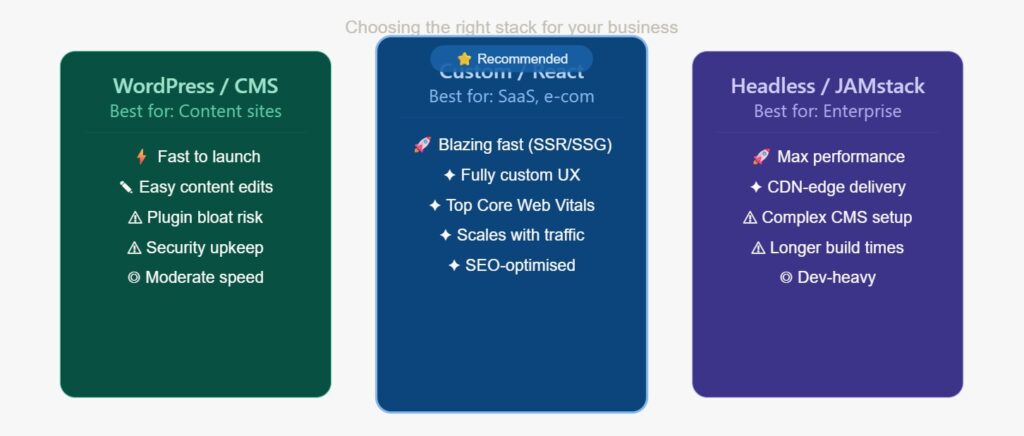
There are Three Stacks Most Indian Businesses End Up On
1. WordPress with a page builder (Elementor, WPBakery)
This is the most common setup and for a good reason. It’s accessible, affordable, and fast to launch. For a service business or blog, it works well.
The danger: over time your plugins start stack up. A typical Indian SME website runs 20–35 plugins, often including 3–4 doing overlapping things. This adds weight, eventually slowing the site, and creating security vulnerabilities. We routinely see WordPress sites scoring 28/100 on Google PageSpeed — not because WordPress is bad, but because nobody cleaned the house.
2. Custom development (React, Next.js, Vue)
If built strong, this is where performance gets serious. A Next.js site with server-side rendering and image optimisation can load the above-the-fold content in under 1.2 seconds on a 4G connection. This is when your Core Web Vitals are strong, SEO is clean, and the UX is aligned with to the brand.
This is what we usually recommend for businesses where the website is a primary lead-generation or sales channel, e-commerce, SaaS products, premium service firms, and anyone running significant paid traffic.
3. Headless / JAMstack (Contentful + Gatsby, Sanity + Next.js)
This is the enterprise grade approach. The content is stored in a dedicated CMS, and the front end is served by a global CDN edge. Page loads appear to be effectively instant. It is usually used by large media companies and e-commerce brands experiencing high-traffic.
The only drawback is the complexity. Your marketing team needs training on the CMS, build pipelines need management, and development costs significantly increase. For most SMEs, this is more infrastructure than the business needs at the stage.